



Kindrel 4G Kids Smart Watch with GPS Tracker
Kindrel 4G Kids Smart Watch with GPS Tracker
Voice calls, 4G video calls and GPS location on your child's wrist, with an SOS button and safe zone alerts — without handing a seven-year-old a smartphone.
- 📞 Calls And Video Calls - Voice and 4G video calls with the contacts you have approved.
- 📍 GPS Location - See where the watch is on the map in the parent app.
- 🏠 Safe Zone Alerts - Get an alert when they arrive at or leave a set zone.
- 🆘 SOS Button - One press alerts you and shares the location of the watch.
- 🏫 Class Mode - Quietens the watch in lessons, on the school schedule you set yourself.


Buy More & Save More
Couldn't load pickup availability
Kindrel 4G Kids Smart Watch with GPS Tracker


Why Everyone's Talking About the Kindrel Kids Smart Watch
4G video calls and GPS location in one watch built for children — the reason parents who are not ready to buy a first phone are choosing a kids GPS watch.


See Them, Not Just Hear Them
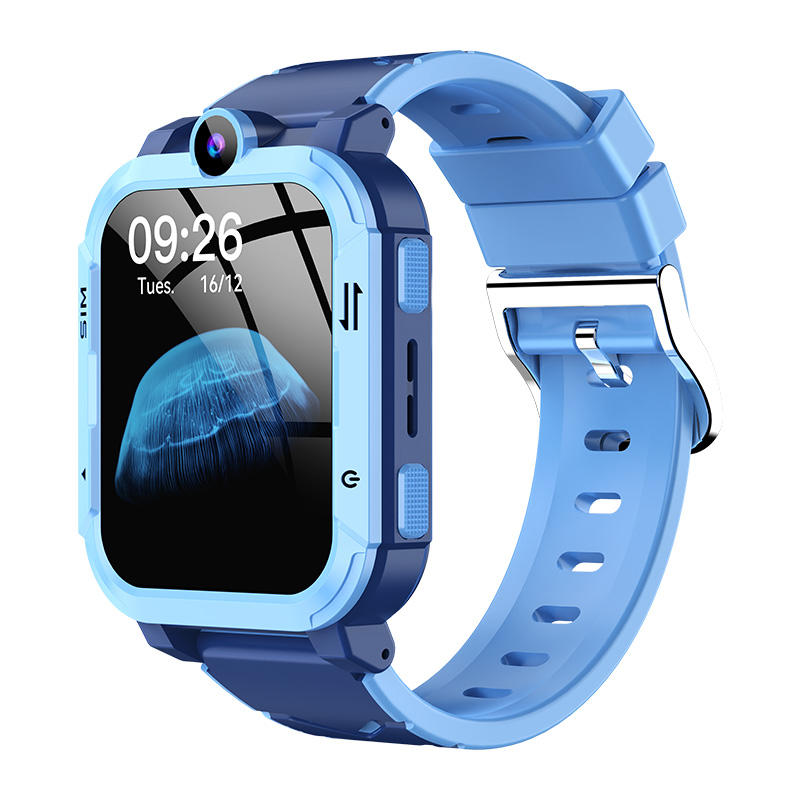
A voice call tells you they are fine. A video call shows you. The front camera on the Kindrel Kids Smart Watch lets your child call you over 4G from the school gate or the park, and you answer on your own phone, wherever you happen to be.

The First Phone Can Wait
A smartphone brings group chats, games and an open browser along with the phone call you actually wanted. Kindrel keeps the call and leaves the rest out. Your child rings the contacts you approve, sends a voice message, and Class Mode keeps the watch quiet through lessons.

Built To Fit Small Wrists
The strap fastens with a metal pin buckle and a long row of holes, so the Kindrel fits a five-year-old now and still fits at twelve. The square touchscreen is controlled by swipes and taps, with a single home button, so children pick it up within minutes.

One Watch, The Whole Family
Up to ten accounts can link to one Kindrel, so both parents, grandparents and the childminder each see the same map on their own phone. The watch charges from the cable in the box, and the SeTracker app runs on iPhone and Android alike, free to download.
How to Set Up Your Kindrel
Setting up takes around ten minutes and no technical knowledge. You need a Nano SIM with calls and data from a UK network, which is not included, and the free SeTracker app on your own phone. Your child does not need a phone at all. Charge the watch first, for a little over two hours.
-

Insert The SIM
Switch the watch off, slide in the Nano SIM and seal the cover
-

Pair The App
Download SeTracker, register by email and enter the registration code from the watch
-

Set Your Rules
Add approved contacts, draw safe zones and switch on Class Mode for school
-

Check In Daily
Open the app each day for location, voice messages and arrival alerts from school


Free Tracked Shipping!
Free Tracked Shipping!
Free Tracked Shipping!
Free Tracked Shipping!
Free Tracked Shipping!
Free Tracked Shipping!
Free Tracked Shipping!
Free Tracked Shipping!
Free Tracked Shipping!
Free Tracked Shipping!
Free Tracked Shipping!
Free Tracked Shipping!
Free Tracked Shipping!
Free Tracked Shipping!
Free Tracked Shipping!
Free Tracked Shipping!
Kindrel vs Others
4G video calls, GPS location and Class Mode — here is how it stacks up against the kids' watches you already know.

|
Others | |
|---|---|---|
4G video calling |
||
GPS location in the app |
||
Safe zone arrival alerts |
||
One-press SOS button |
||
Class Mode for school |
||
No social media or browser |
||
Up to ten family accounts |
||
UK returns and support |
We have the answers to all your questions
Frequently asked questions
What is the Kindrel watch for?
It lets a child aged 5 to 12 call you, video call you and share their location without owning a smartphone.
Do I need an app or a subscription?
The SeTracker app is free. You do need a Nano SIM with calls and data, bought separately from a UK network.
How do safe zones work?
Draw a zone around home or school in the app and you receive an alert when the watch enters or leaves it.
How does it charge?
With the charging cable in the box and any standard 5V 1A USB plug. Give it over two hours before first use.
How many family members can connect?
Up to ten accounts can link to one watch, each on their own iPhone or Android phone.
Will it fit my child?
The strap has a long row of adjustment holes and a pin buckle, sized for children aged 5 to 12.
Where can they wear it?
At school, at the park and on the walk home. Take it off for swimming, baths and showers.
Is the location always exact?
No. Location and alerts depend on mobile and GPS signal and can be delayed. The watch supports supervision and does not replace it.